New Release 3.8.3
Check Out the Details
Hotel Restaurant Software

Seat the whole stay in one drag.

Half-board planned for the whole stay, allergies and birthdays on one list, and à la carte booked online. One restaurant system on top of your PMS.

Host · Anna, 15:00

Step 1 · Arrivals

Every arrival is already on your table plan. Nothing to type.

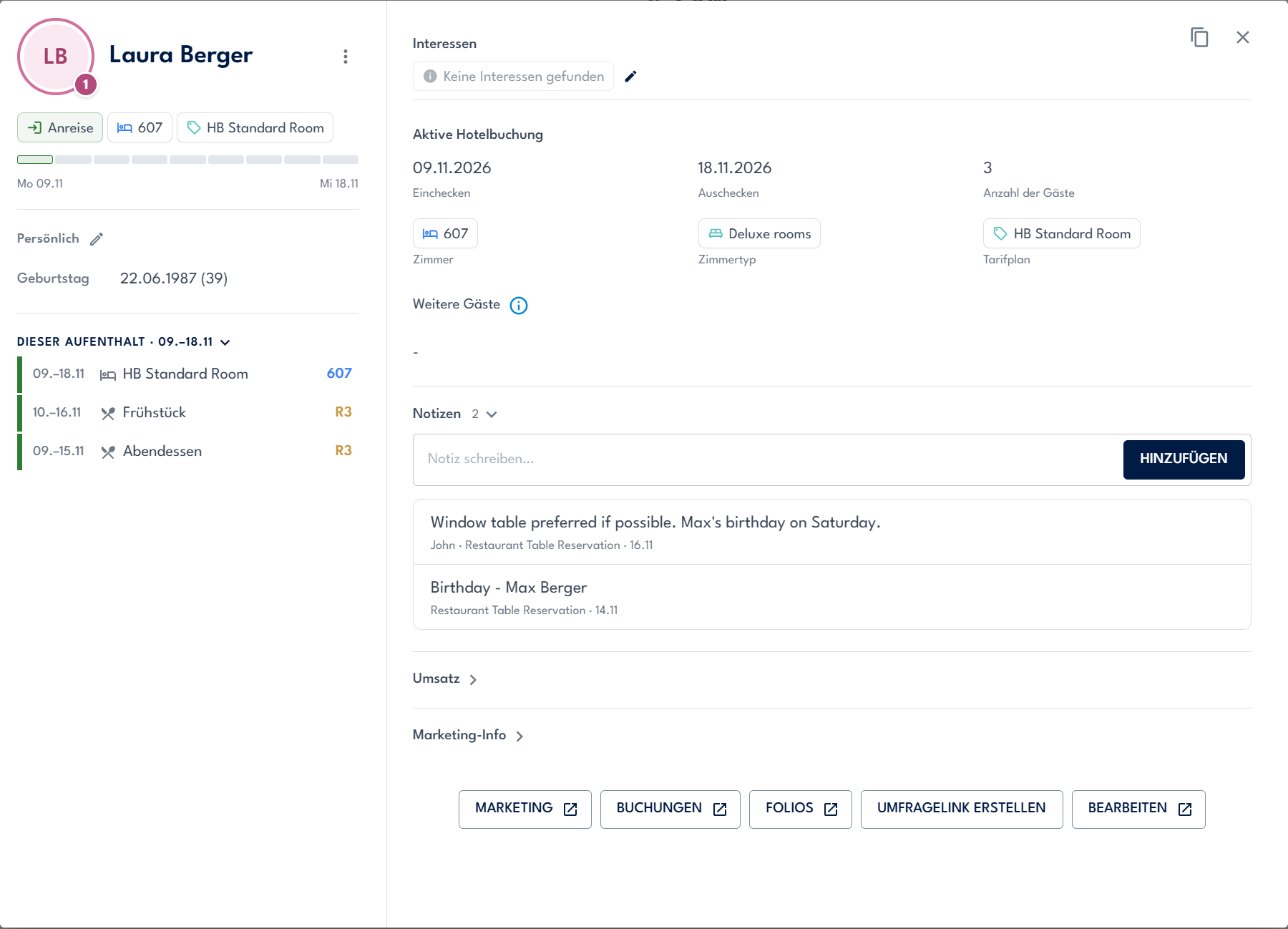
Laura Berger checks in today with her husband Max and daughter Mia. Before she reaches reception, her stay is waiting in the restaurant.

  1. Today's arrivals come straight from the PMS
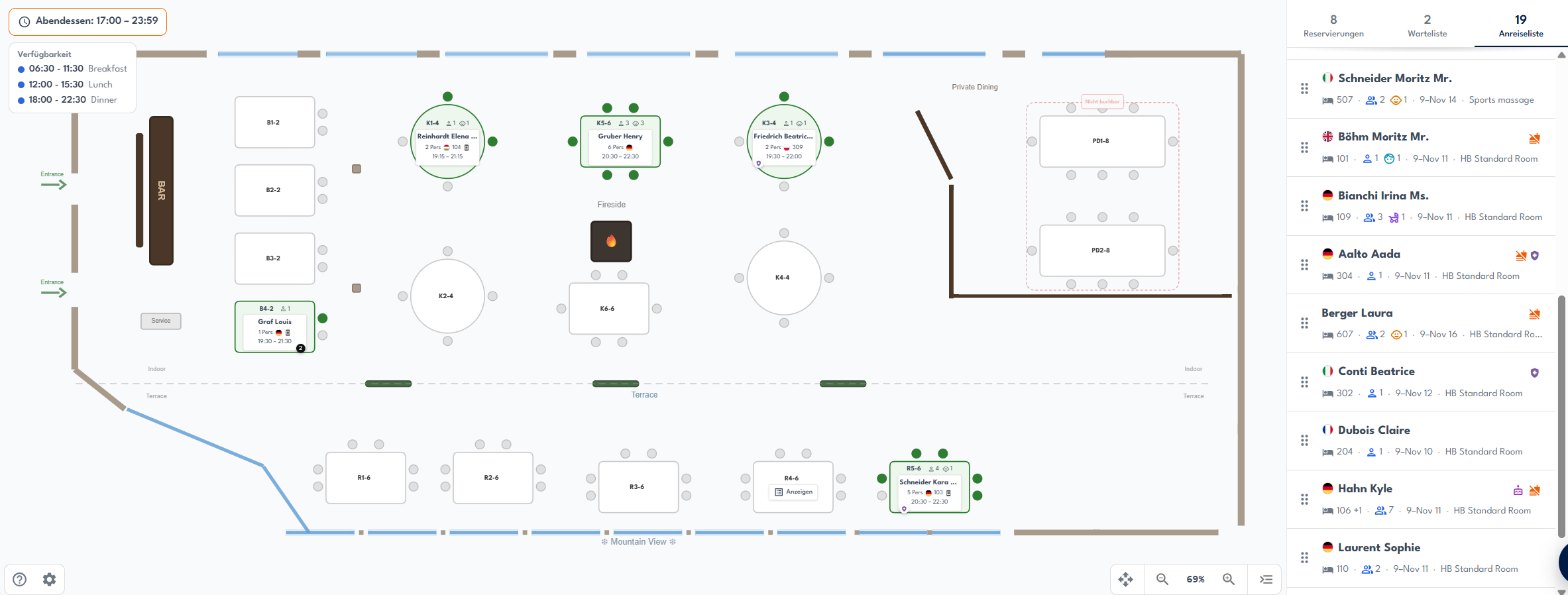
  2. Laura shows up in the arrivals list next to the floorplan
  3. Room 607, half-board, 2 adults and 1 child, already filled in
  4. Her note and Mia's allergy travel with the booking

Restaurant · Tischplan · Panorama Restaurant

Crqlar floorplan of the Panorama Restaurant with today's arrivals list on the right

Berger Laura

607HB2 + 19–16 Nov

!
“Window table preferred if possible.” · Mia: nut allergy

Host · Anna

Step 2 · Half-board

One drag seats the whole stay. Breakfast and dinner, every day.

Anna drags Laura onto R3 by the window. Crqlar books the series for the stay: dinner from the arrival evening, breakfast from the next morning, nothing on the departure evening.

  1. Drag the guest from the arrivals list
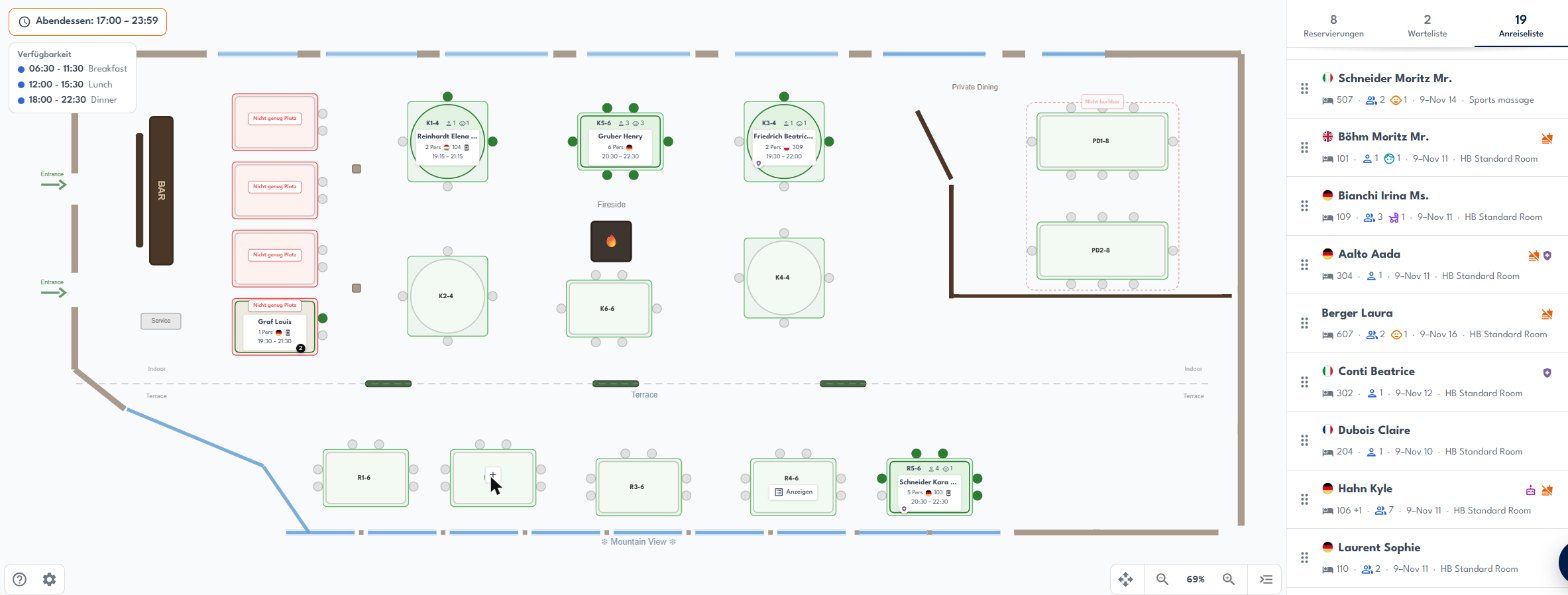
  2. The plan shows which tables fit a party of three
  3. Party size fills in from the hotel booking
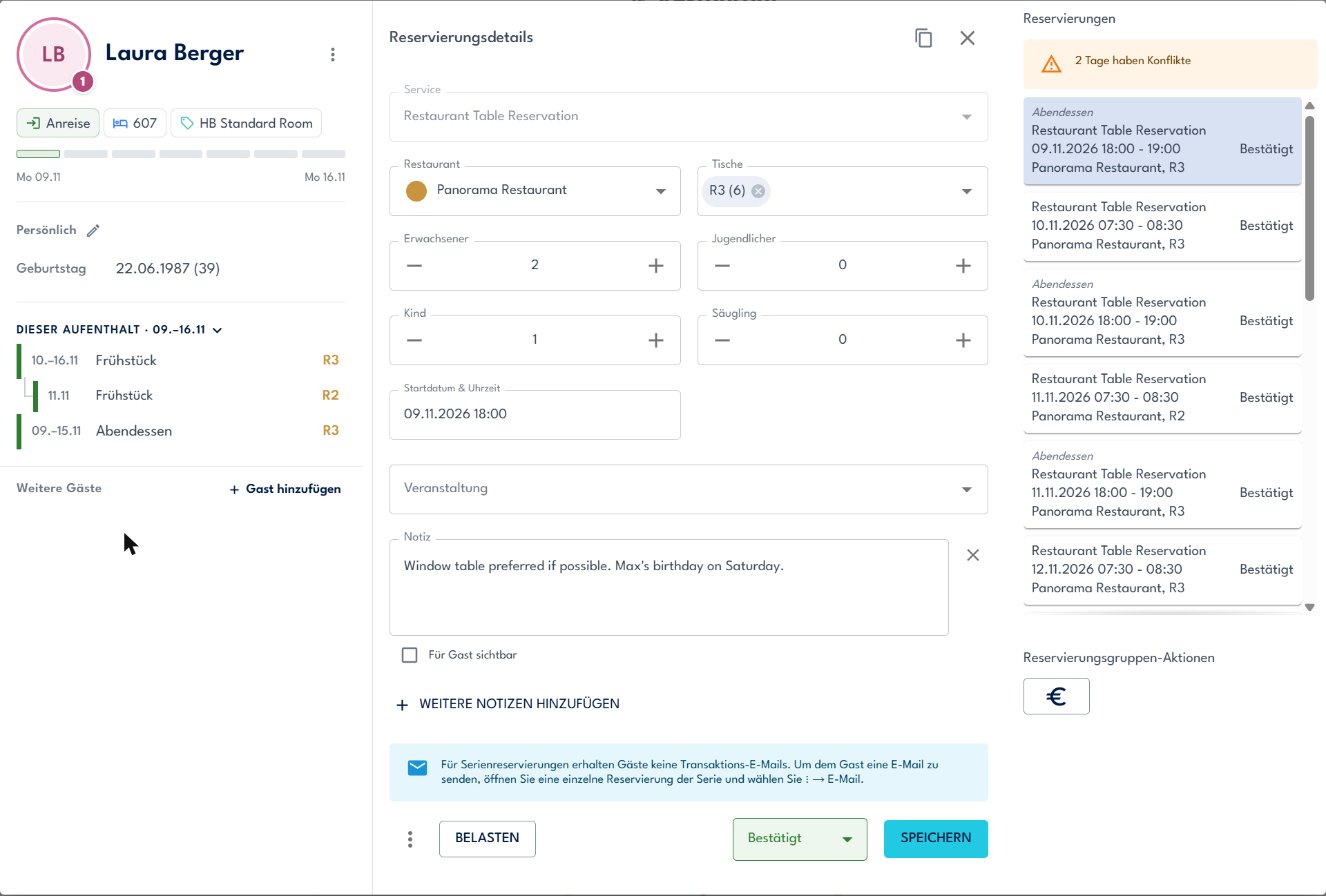
  4. Breakfast and dinner for the whole stay, with a clash check
  5. Laura has her table for seven nights

Restaurant · Tischplan · Mo 09.11.2026

Floorplan while dragging a guest: tables that fit are green, small tables say not enough space
Reservation dialog for Laura Berger: breakfast 10 to 16 November and dinner 9 to 15 November at table R3

7 dinners, 7 breakfasts booked on R3 in one go

Chef de rang · Lukas, 18:05

Step 3 · Service

Everyone sees who sits where. Status changes in one click.

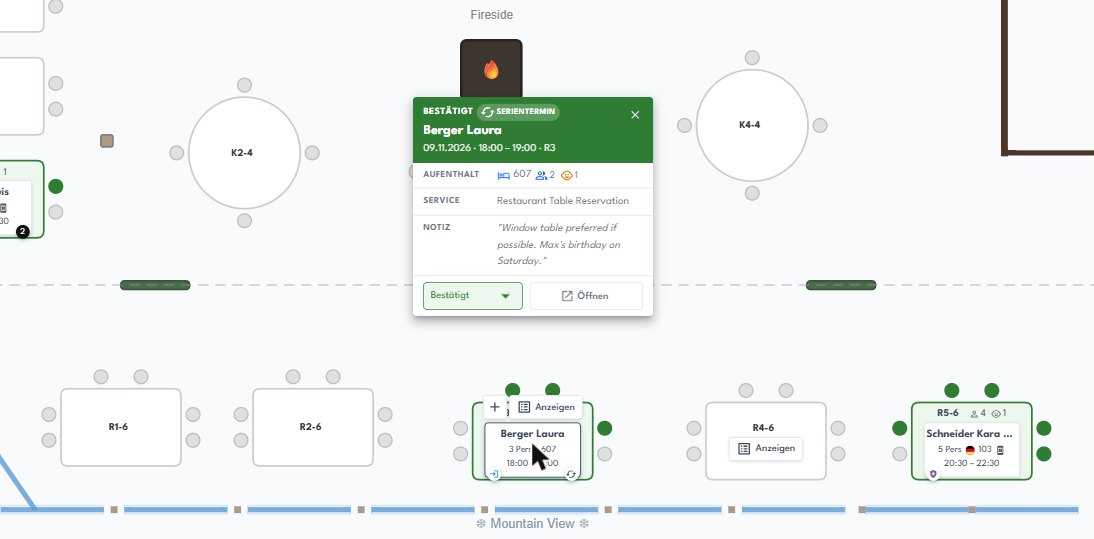
The floorplan is the real room, with room numbers on the tables. Lukas checks Laura's table, sees her note, and marks the family as seated.

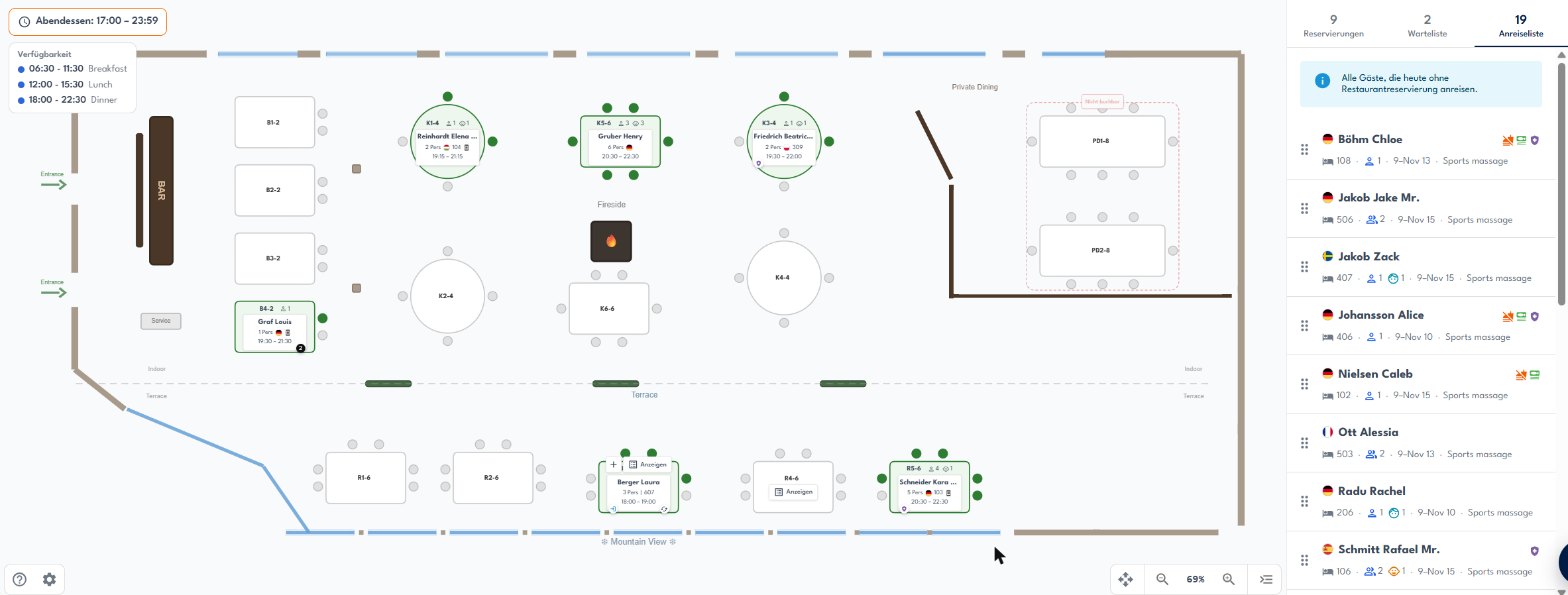
  1. Laura's family on R3, room 607, 18:00
  2. Hover the table: party, stay, note
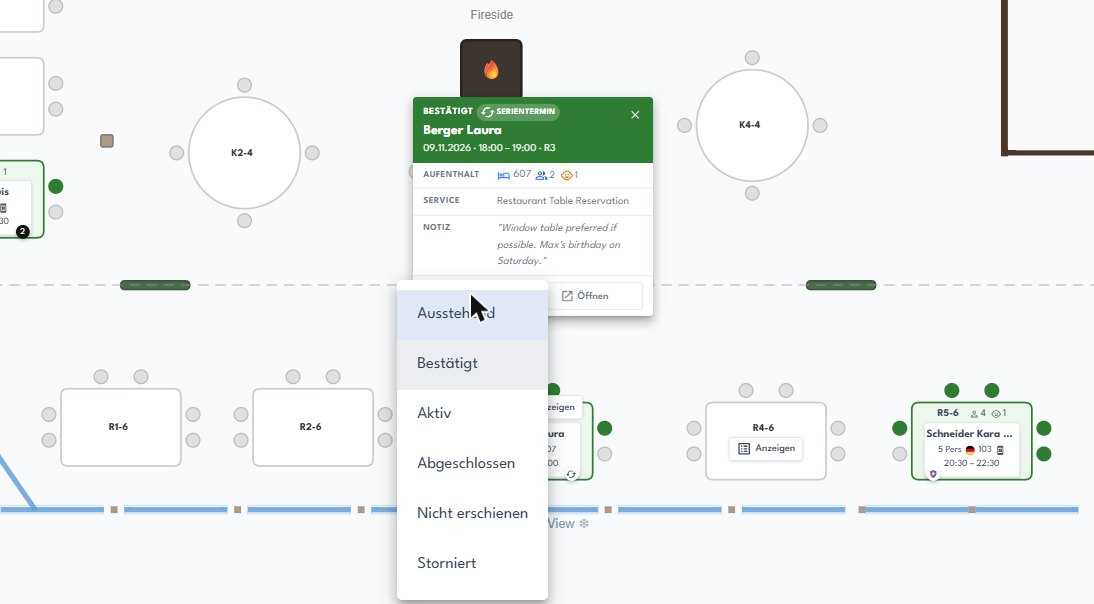
  3. Seated, completed or no-show in one click
  4. On the tablet: tap for details, hold to edit

Tischplan · Panorama Restaurant

Hover popup on table R3: confirmed series booking for Laura Berger, room 607, 2 adults and 1 child, with her note

Several restaurants open in tabsWorks on tablet and desktop

Host · Anna, 17:30

Step 4 · Briefing

Allergies and birthdays on one list. Before the first guest sits down.

The daily list shows every table of the evening with the details that matter for service: who is in the party, allergies and diets, PMS notes and recommendations.

  1. Tonight's guests with table, time and room
  2. The Berger family: Laura, Max and Mia
  3. Mia's nut allergy, flagged for the kitchen
  4. Saturday: Max's birthday, flagged automatically
  5. Print it for the briefing, or work from the tablet

Restaurant · Tägliche Liste

Daily list with the Berger family expanded and a nut allergy flag for Mia
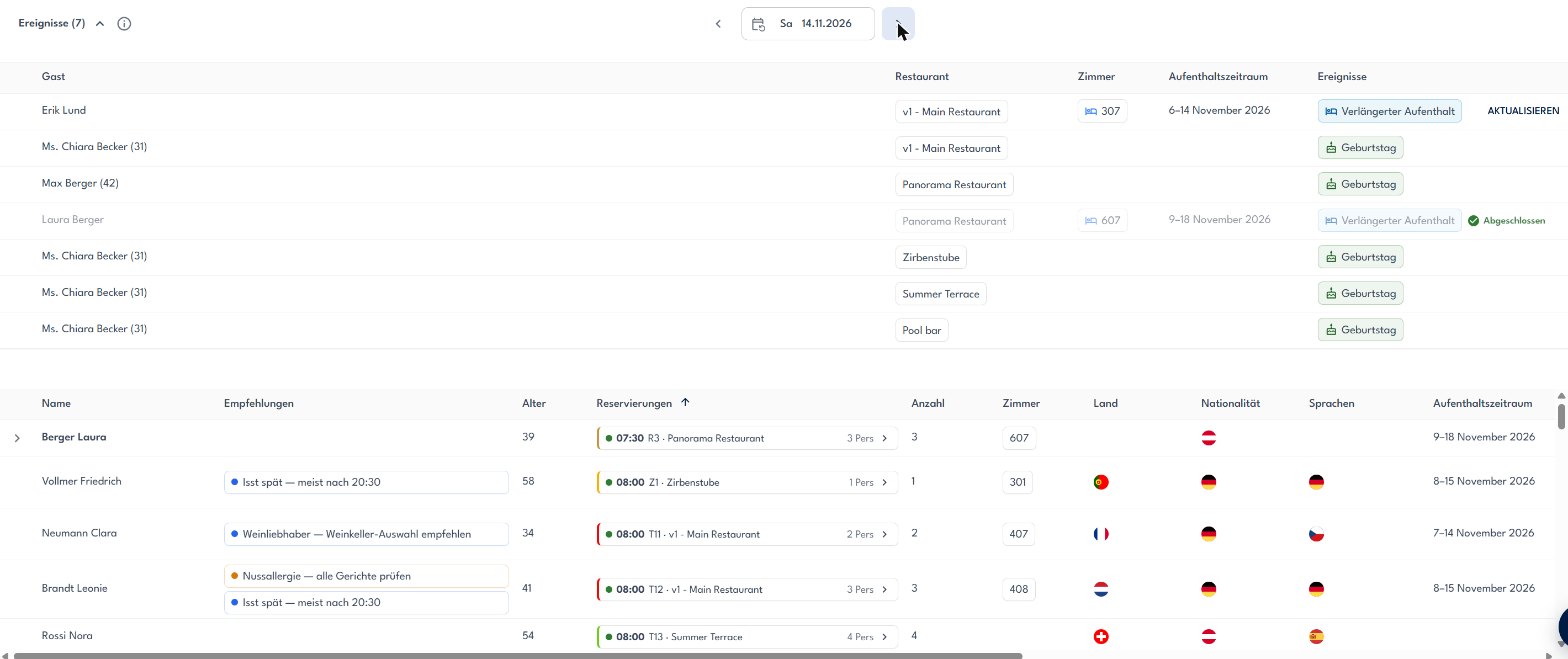
Events on Saturday 14 November: birthday Max Berger, Panorama Restaurant
Printout with board codes, allergies and notes

Host · Anna, next morning

Step 5 · Stay changes

Stay changes don't break the plan. Your table plan updates itself.

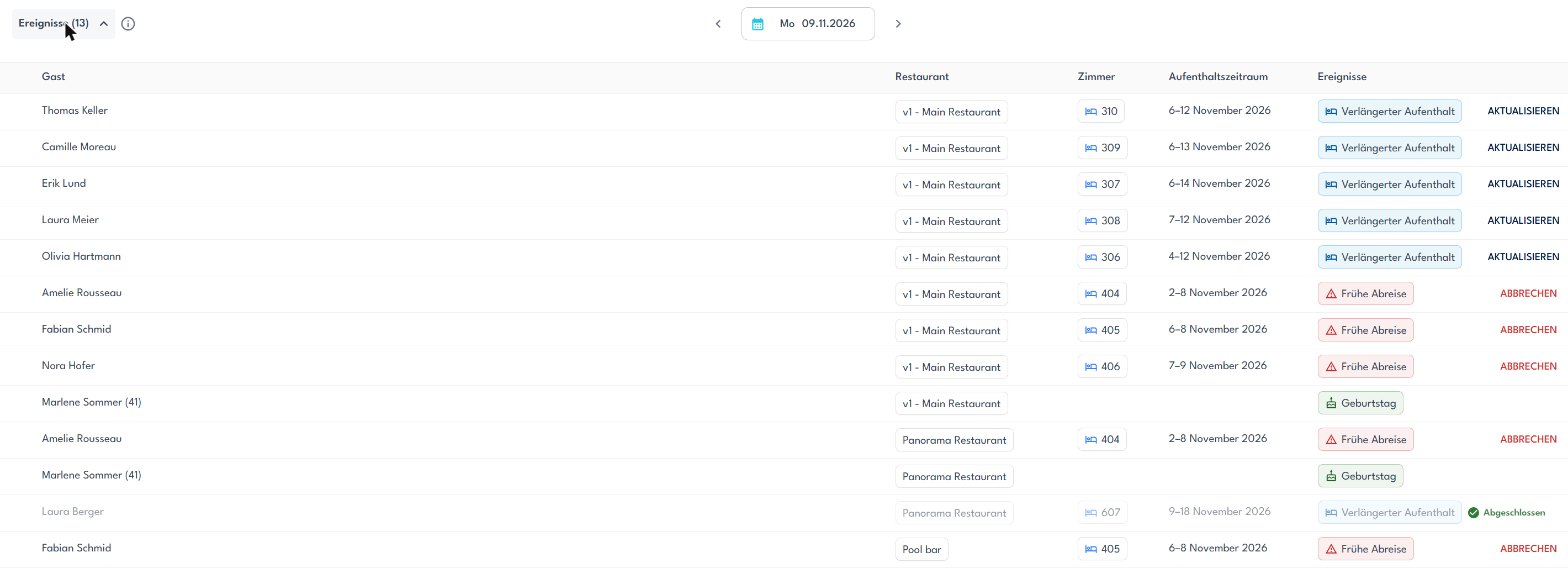
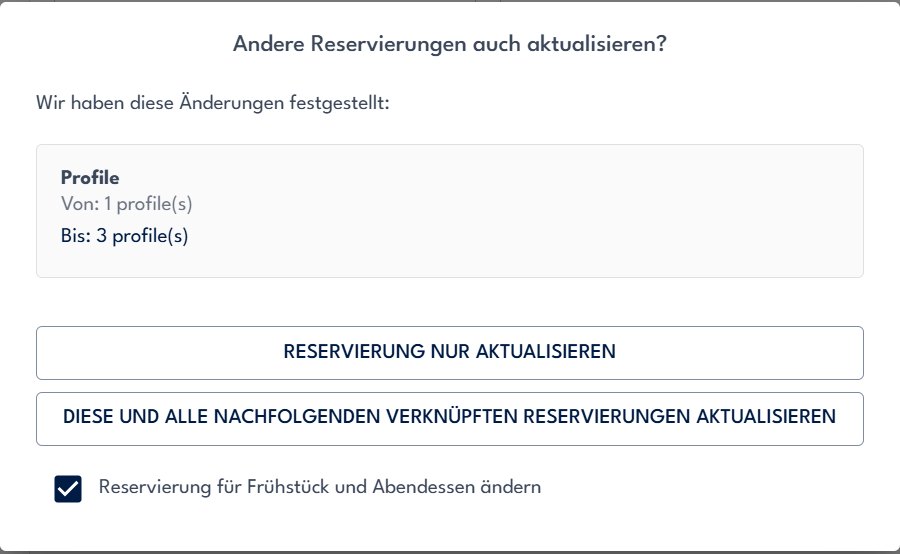
Laura likes it here and adds two nights at reception. Crqlar sees the change in the PMS and extends her meals. Early departures release their tables the same way.

  1. Reception extends Laura's stay in the PMS
  2. Crqlar spots the longer stay right away
  3. Her meal series is extended automatically
  4. Early departures: remaining meals cancelled in one click
  5. Change breakfast and dinner together, in one step
PMS · room 607
Departure
16.11.
18.11.2026

Tägliche Liste · Ereignisse

Events on the daily list: extended stays, early departures and birthdays; Laura Berger 9 to 18 November, extended stay, completed
Prompt: update this and all following linked bookings, change breakfast and dinner together

Guest · Laura, on her phone

Step 6 · À la carte

À la carte booked online. The birthday dessert sold before they arrive.

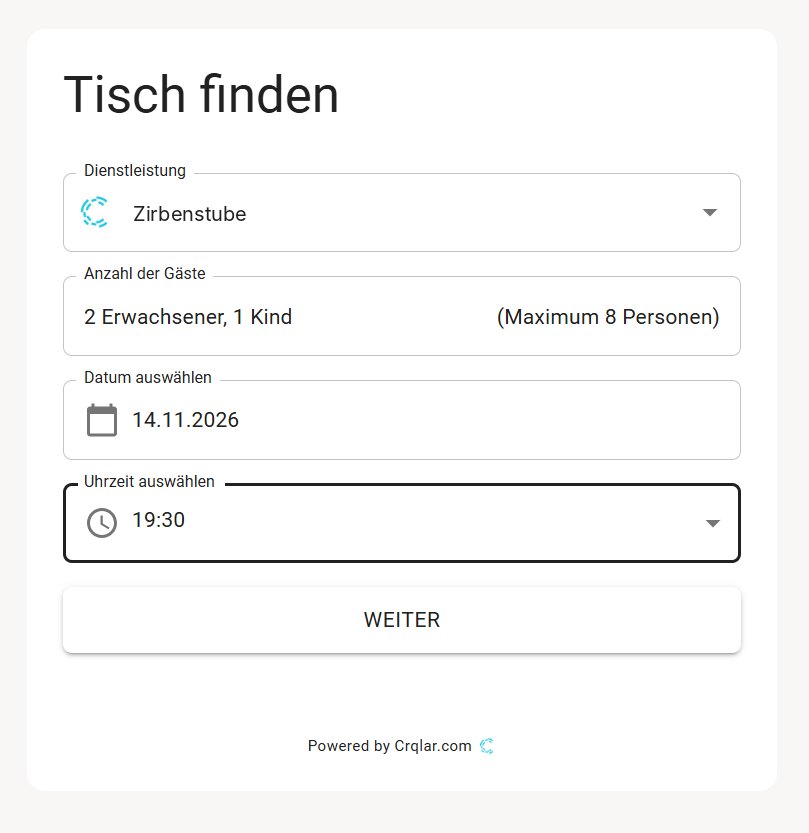
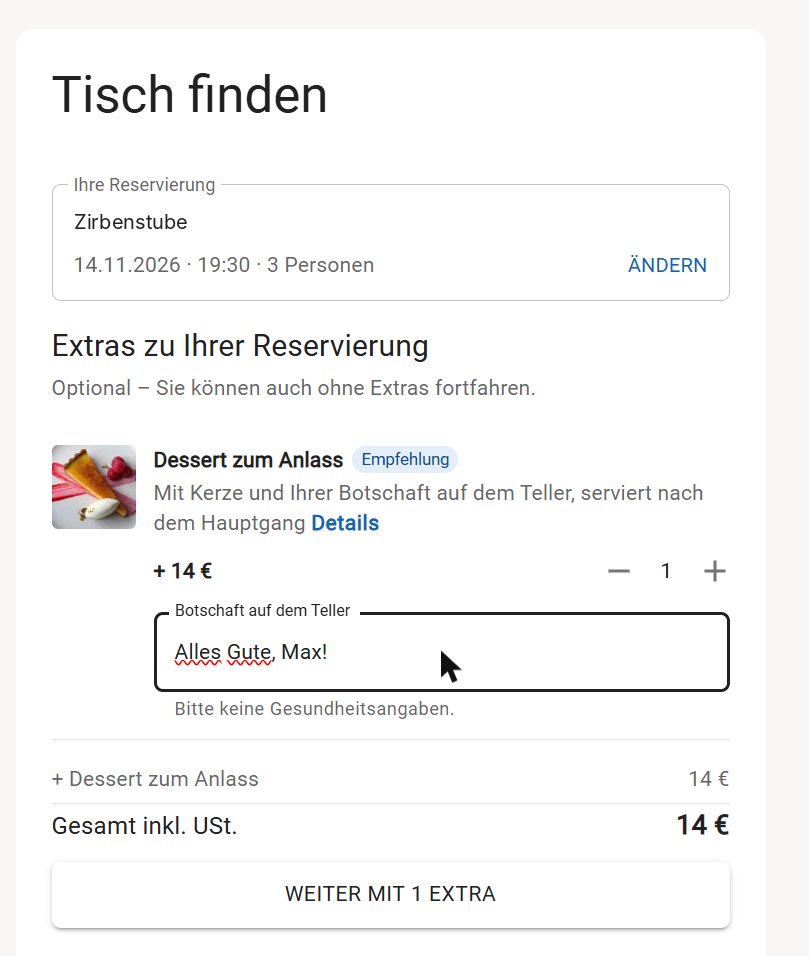
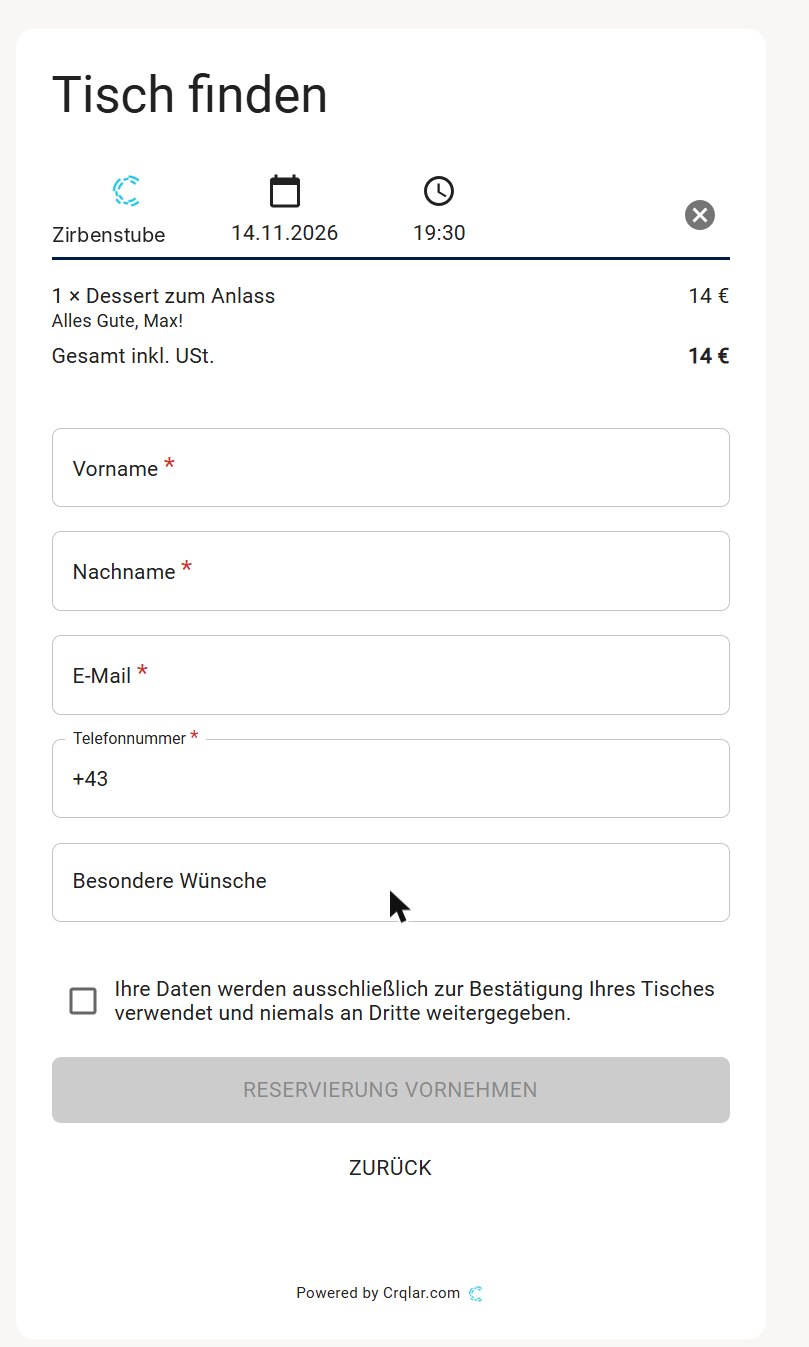
For Max's birthday, Laura books the Zirbenstube on the hotel website. She picks a time, adds a dessert with a candle and a message, and the table is assigned for her.

  1. Party size, date and time in three taps
  2. A table is assigned automatically, up to the limit you set
  3. Birthday dessert with a personal message, +14 €
  4. Card guarantee for larger parties, no-show fee if they don't come
Booking widget: Zirbenstube, 2 adults and 1 child, 14.11.2026, 19:30
Booking widget extras: birthday dessert with candle and message, 14 euros
Booking widget last step: guest details
Table assigned automatically
€

+14 € upsell “Alles Gute, Max!” goes to the kitchen

Step 7 · Behind the click

No double entry. Your PMS and the guest profile stay in sync.

Stays, rooms, board codes and notes come in from your PMS. Every visit, table, allergy and birthday lands on one guest profile that restaurant, spa, front office and marketing share.

From your PMS

Stay9–18 Nov

Room607

BoardHalf-board

Party2 adults, 1 child

Notes & birthdayssynced

Guest profile · Laura Berger

Guest profile of Laura Berger with this stay, breakfast and dinner series and notes including Max's birthday

Works withOracle OPERA CloudSuite8MewsApaleoprotelASACasablancaEliteGastrodatFIAS

Restaurant charges go to the room bill with Mews, Apaleo, ASA, Casablanca, Elite and FIAS-connected PMS. F&B revenue per guest comes in from Oracle Simphony.

See this with your own half-board.We set up your restaurants and floorplans with you, on top of your PMS.

Book a demo

Guest → Marketing

Step 8 · Feedback

Feedback on autopilot. More 5-star reviews on Google.

Each hotel builds its own automation. After the stay, Laura gets a short survey. If she is happy, she is invited to leave a Google review.

  1. Trigger: the stay is completed
  2. The survey goes out, with a reminder if needed
  3. Laura rates dinner 5 stars
  4. Score above 80%: a Google review link follows

Automation · Post-stay feedbackActive

⚑

Stay completedTrigger · from your PMS

✉

Send survey “How was your stay?”1 day after check-out · reminder after 3 days

★

If score > 80%Condition

G

Ask for a Google reviewLink in a thank-you mail

!

Else: notify the teamF&B manager

HOTEL ALPENBLICK
How was dinner in the Panorama Restaurant?
The window table every night
The birthday dessert

Thank you, Laura!Would you share it on Google?

Marketing · Julia

Step 9 · Marketing

Fill the quiet nights with families who love your half-board. In a few clicks.

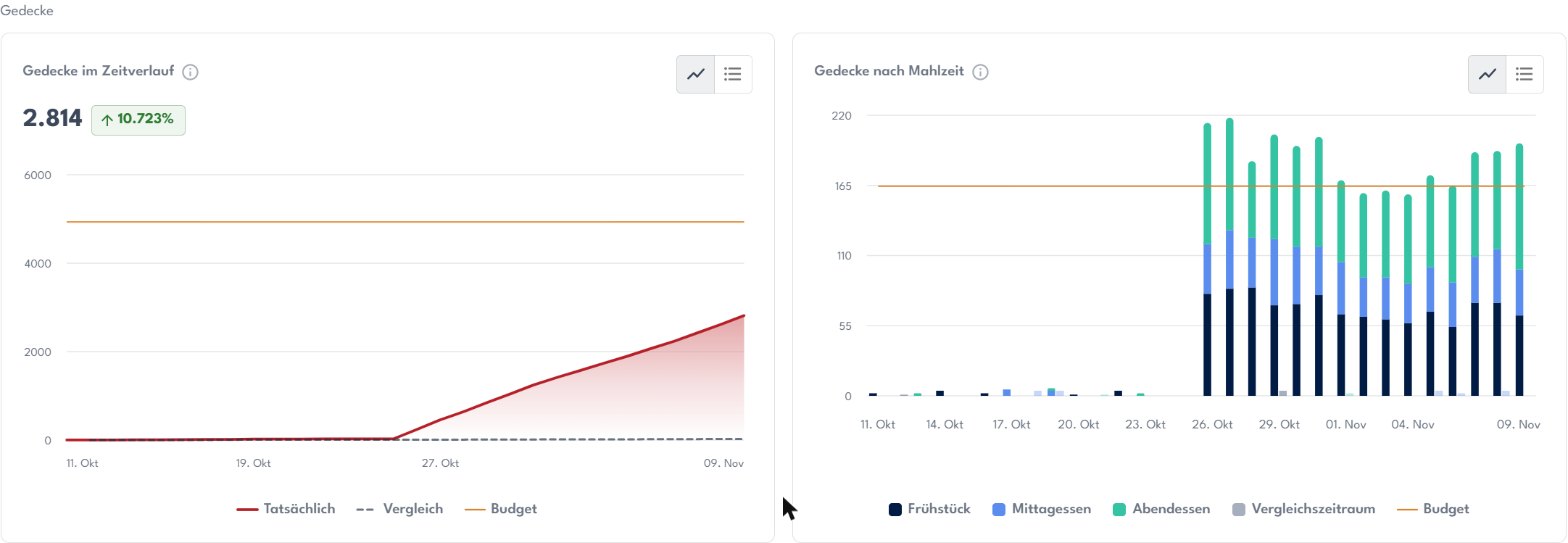
Julia sees which evenings run below plan. She builds an audience from real stays and sends it to the newsletter and Facebook / Instagram.

  1. Covers per day, by breakfast, lunch and dinner
  2. The quiet nights stand out against your budget
  3. Audience: families on half-board, opted in
  4. Newsletter and Instagram ad, from the same list

Restaurant · Analyse · Gedecke

Restaurant analytics: covers over time and covers by meal per day against budget

AudienceFamilies on half-board

Stays with board HPParty includes childrenNewsletter opted in

Guests in audience0

Hotel AlpenblickYour family table is waiting

Half-board week for familiesBreakfast with a view, dinner at your own table every evening.

See dates

Hotel AlpenblickSponsored

Book now›

hotelalpenblick Breakfast with a view, dinner at your own table.

What it adds up to

Eight tools out. Your PMS and Crqlar in.

Laura's stay touched the arrivals list, table plan, daily list, booking widget, guest profile, survey and marketing. In most hotels that's eight tools that don't talk to each other.

Paper table plan

CRM

Newsletter system

BI / reporting

Restaurant software

Spa software

Survey tool

Guest app

Your PMSRooms, rates & folios

MewsApaleoASACasablancaEliteOPERA

Crqlar

Everything around the guest

  • Restaurant
  • Spa
  • CRM & marketing
  • Newsletter
  • Insights & BI
  • Surveys
  • Guest app
  • Weekly planner

8 contracts, 8 logins, 8 data silos become one system on top of the PMS you already use.

60–80%less manual admin time

1–3 hback for the service team, every day

+114%occupancy with smart table and no-show management

+13.2%more conversions

Crqlar helps us run our half-board restaurant more efficiently, simplify our processes and give our guests an even better dining experience.

Melanie Theiner · Restaurant Manager, Berghotel Rehlegg

Everything in the restaurant module

All features at a glance

Built for hotel restaurants: half-board, à la carte, guest details and insights in one place.

Half-board

  • Breakfast and dinner series for the whole stay in one step
  • No breakfast on arrival day, no dinner on departure day
  • Change breakfast and dinner together
  • Party size and age groups filled in from the PMS
  • Group and family rooms shown as one party
  • Arrivals list of guests still without a table

Floorplan & service

  • Your real room, drawn with tables, walls and labels
  • Drag and drop guests onto tables that fit
  • Hover popup with stay, party and notes
  • One-click status: seated, completed, no-show
  • Several restaurants open in separate tabs
  • Tablet mode: tap for details, hold to edit

Guest details

  • Daily list with allergies, diets and PMS notes
  • Birthdays flagged automatically on list and floorplan
  • Recommendations, like the same table as last stay
  • Warnings for double bookings and blocked tables
  • Printouts with board codes, rooms and counts
  • Voice notes attached to the guest profile

À la carte & online booking

  • Booking widget on your website, in your design
  • Tables and combinations assigned automatically
  • Auto-assign only up to an occupancy you choose
  • Extras like a birthday dessert during booking
  • Card guarantee and no-show fees via Stripe or Hobex
  • Card link by email for phone bookings

PMS & billing

  • Connected to OPERA, Suite8, Mews, Apaleo, protel, ASA, Casablanca, Elite and more
  • Extended stays and early departures picked up automatically
  • Charge to the room bill where your PMS supports it
  • F&B revenue per guest from Oracle Simphony
  • No double entry between reception and restaurant
  • One guest profile shared with spa and marketing

Insights & marketing

  • Covers by day and by breakfast, lunch and dinner
  • F&B revenue, no-show rate and à-la-carte share
  • Budgets and comparison with any period
  • Audiences synced to your newsletter and Facebook / Instagram
  • Post-stay surveys and Google review requests
  • Restaurant manager and restaurant user roles
FAQ

Questions restaurant teams ask us

Can't find yours? We're happy to show it live in a demo.

Book a demo

Do I need to replace my PMS?

No. Crqlar sits on top of the PMS you already use. Stays, rooms, board codes and notes sync in automatically, so nobody types a booking twice.

Which PMS does Crqlar connect to?

Oracle OPERA Cloud, Oracle Fidelio Suite8, Mews, Apaleo, protel, ASA, Casablanca, Elite and Gastrodat, plus a FIAS connection for other systems. If yours is missing, ask us: there is an open API.

We use Oracle Simphony as our POS. Does Crqlar work with it?

Yes. Crqlar for Simphony is validated by Oracle and listed on the Oracle Marketplace. Your floorplan and reservations open right inside the Simphony POS, so staff never leave the till. When a reservation is seated, an empty check opens on the matching Simphony table with every guest’s name, room, allergies and diets. Staff ring items as usual, and every paid check from restaurant, bar or spa lands on the guest profile, so you see what each guest spends. Crqlar never adds items, takes payments or closes checks, and it reads no card data. You need Simphony 19.10 with a Transaction Services Gen2 licence; we install it together with your Simphony administrator.

Crqlar for Simphony on the Oracle Marketplace →

What happens when a guest stays longer or leaves early?

Crqlar picks up the change from your PMS. Longer stays get their meal series extended, early departures release their tables, and every change shows up on the daily list so your team knows what happened.

Can we plan breakfast and dinner separately?

Yes. Each meal has its own series, table and time. When you move a guest, you can change breakfast and dinner together or just one of them.

Can guests book à la carte tables online?

Yes. The booking widget sits on your website in your own design, shows only free times and assigns tables automatically. You decide up to which occupancy it books on its own.

What about no-shows?

You can ask for a card guarantee from a party size you choose, send phone bookings a card link by email, and charge a no-show fee through Stripe or Hobex.

We have several restaurants. Does that work?

Yes. Each restaurant gets its own floorplan, times and tables, and all of them share one guest profile. You can keep several floorplans open in separate browser tabs.

Who draws our floorplan?

Our team sets up your restaurants and floorplans with you. Afterwards you can change tables, walls and labels yourself in the floorplan editor.